Foresight

Equitable transport starts
on the footpath.

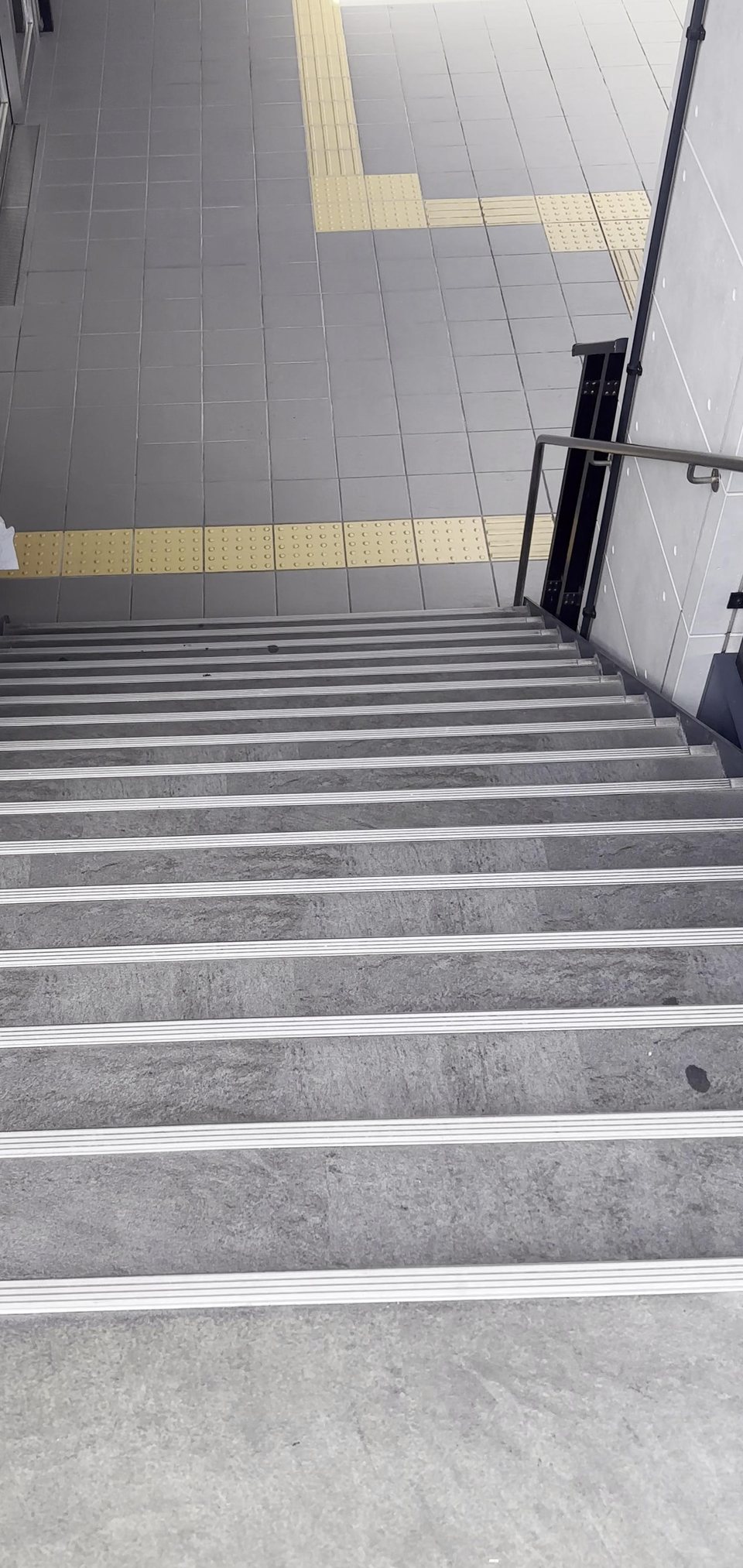
The Foresight app's camera view from the top of an outdoor staircase going down, with a box around the stairs and the warning: Stop. Stairs going down ahead.

If you can't drive, the footpath is how you reach the bus, the train, work and school. A standard white cane only knows what it touches. Our project, Foresight, identifies critical dangers along the path and alerts the user. Our goal is to ensure equitable access to transport for people with visual impairment, so everyone can travel safely and independently.

A bus stop isn't accessible
if the footpath to it isn't accessible.

Blacktown's transport plan wants more people walking and catching public transport. For people with visual impairment, that depends on footpaths they can't fully see.

96%

of people who are blind or have low vision have recently run into a blocked footpath.1

8,700

Blacktown residents estimated to have a vision impairment, based on the national rate of 2.2%.2

What's blocking the way to the bus and the train1

  • Overhanging branches63%
  • Road works55%
  • E-scooters & e-bikes49%
  • Café tables & chairs46%
  • Shop displays44%
  • Parked cars43%
  • Rubbish bins33%
“Physical barriers or non-inclusive design in public can make it really difficult and dangerous.”
“For me the lack of tactile surfaces in public is also a major barrier.”
Jamal Abdul, 30, a Guide Dogs client who uses a white cane1

Our mission: ensuring equitable access to transport

Without safety and independence, many people are left relying on expensive private transport, or being unable to leave their homes.

Equity means the same transport is accessible to everyone regardless of their capabilities.

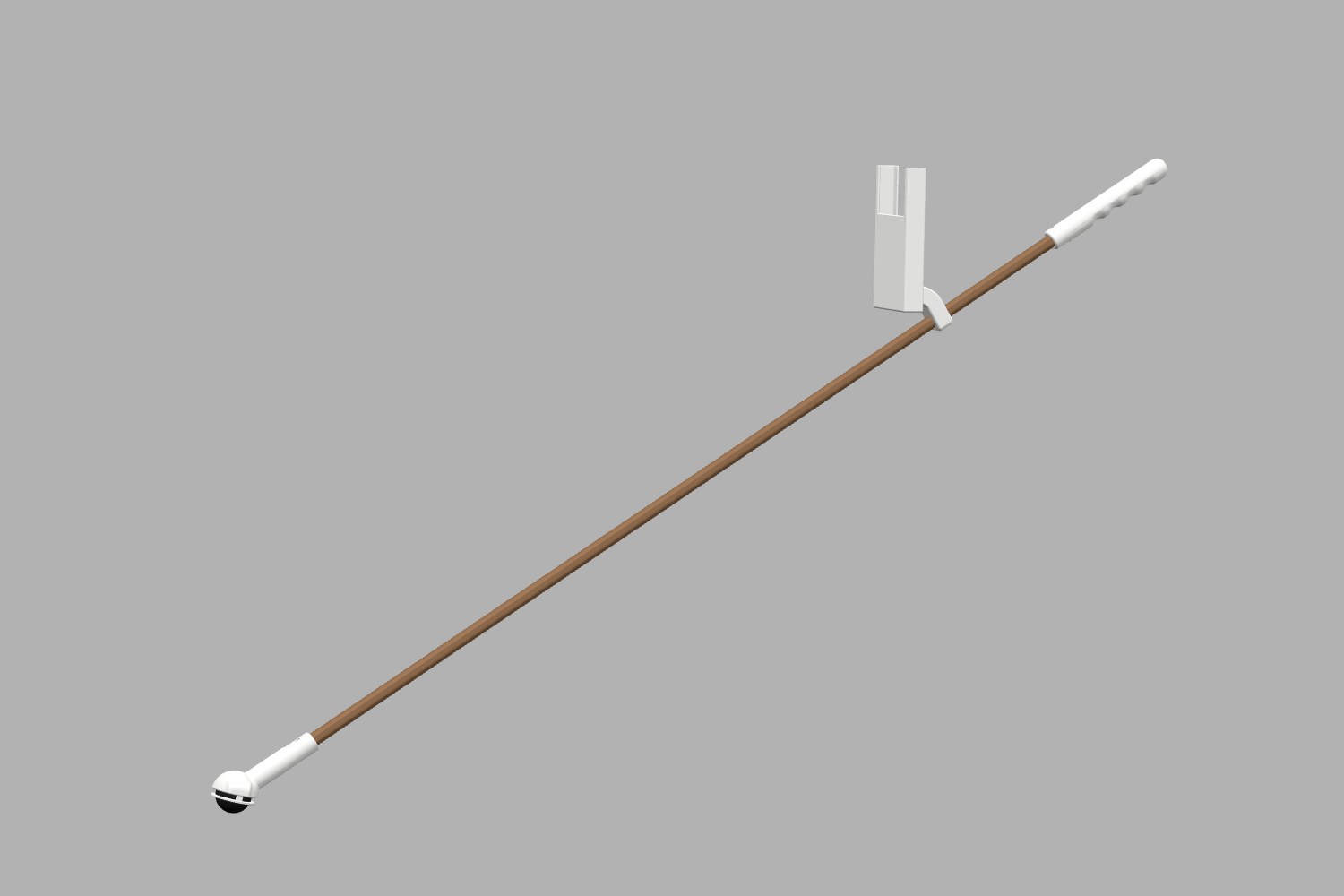
The Foresight cane.

A 3D render of our Foresight cane, highlighting each of our tailored parts.

A 3D render of the Foresight cane: a shaped handle at the top, a long shaft, a phone holder clamped partway down, and a rolling ball at the tip.

How it works

How the model sees

  1. One photo from the camera. That's all it gets, many times a second.
  2. It looks at the whole picture once. All 409,600 pixels together, layer by layer, from edges to shapes to things.
  3. Every hazard, and where it is. It weighs up 300 possible boxes in the same pass, then keeps the ones it's sure of.
  4. You Only Look Once. That's what YOLO stands for. We train YOLO26, Ultralytics' open-source model, on our own data. No second look, so it keeps up as you walk.
  5. Trained on 88,142 photos. 593,544 labelled boxes and over 50 GB of images, with more than 16 hours of training for each version.
  6. Then it speaks. The app picks the one warning that matters most and says it through bone-conduction headphones, leaving your ears open to traffic.

How Ask works

  1. Ask it a question. Press Ask and say it out loud, like “What's in front of me?”
  2. The photo becomes tokens. A vision encoder reads the photo in 16-pixel patches. Each 2 × 2 is merged into one token, and a projector passes them on.
  3. YOLO adds a hint. The detector says exactly what it found and where, so the answer stays grounded.
  4. Then it writes, one word at a time. Liquid AI's LFM2 model mixes fast convolution layers with attention layers. 450 million parameters, on the phone, with no internet.
  5. Built on open models. LFM2.5-VL is Liquid AI's open model. YOLO26 is Ultralytics' open-source model. Hazard warnings come from YOLO alone, so they never wait for Ask.

Smart where it counts.

27

kinds of hazard, each with its own warning.

88,142

photos

593,544

labelled annotations

trained our own AI model to read a footpath.

Zero

camera images ever leave the phone.

Offline

Everything runs on the phone, with no internet at all.

Each of the 27 hazards has one of three warning levels.

Critical

Stairs going down, holes, open manholes and red lights. Always spoken, starting with “Stop”.

Obstacle

Steps up, kerbs, poles, bins, people, cars, e-scooters and 13 more. Spoken when they're in your path and you're getting closer.

Guidance

Crossings, green lights and tactile paving. Spoken softest.

A camera that looks further ahead.

The phone's camera scans the path many times a second, and warns you sooner when something is coming towards you.

97 in 99 warnings were correct.
With one hazard missed.

Our latest, larger test was on 9 November, across 2 users and 2 walks. Testers limited their own vision to simulate a blind user, with a spotter for safety. They were sighted testers, not vision-impaired users.

97

correct warnings

2

false alarms

1

hazard missed

Expert review

A biomedical engineer
challenged our assumptions.

These are his questions, and how we tackled them.

The key issue we fixed

What will you do about users getting desensitised to alarms?

Most warnings aren't an immediate danger and don't need action, and that leads to alarm fatigue. In hospitals, 72% to 99% of alarms are false or non-actionable, so people start treating every beep as background noise. This effect means real emergencies can go unnoticed or get dangerously slow reactions.3

We took inspiration from this medical research, so Foresight is built from the ground up to stop users becoming desensitised to warnings. A hazard must be seen for 0.25 s before it counts, which stops glitches. Stairs, holes and red lights are always spoken. Other obstacles are only spoken when they're in your path and you're getting closer.

After Dr Canchi's feedback, we completely reworked how the app decides what to say, to keep spoken warnings under 3 a minute.

Implemented

How do you tell a dangerous obstacle from a minor one?

The app sorts each of the 27 hazards into three levels: Critical, Obstacle and Guidance. Anything you could fall into is critical and starts with “Stop”. A staircase always goes before a person.

Implemented

Are there volume levels for different dangers?

Yes. “Stop” warnings play at full volume and slightly slower, ordinary warnings a little quieter, and guidance softest, so you can tell them apart.

Implemented

Also on their list

  • Testing with low-vision users

    A young student with low vision gave feedback on our prototypes, which changed the handle, the ball tip and the phone holder. Testing with more cane users comes next.

    Started
  • False alarms and missed hazards

    In our latest walk test, 97 of 99 warnings were correct and one hazard was missed. The white cane stays the main safety aid.

    Tested
  • Response time

    0.375 s for critical dangers, averaged over 10 slow-motion tests.

    Tested
  • Moving obstacles

    It works out how fast something is closing in, and warns earlier if it's coming at you.

    Implemented
  • Customisation

    Three warning styles, plus muting for street furniture. Stairs, holes and red lights can never be muted.

    Implemented
  • Transport mode

    Guides you to bus stops, trains or saved locations, using places stored on the phone.

    Implemented
  • Privacy

    Everything runs on the phone, and no camera image ever leaves it.

    Implemented
  • Overhanging branches

    The most-reported footpath obstacle. Our prototype has time-of-flight and ultrasonic sensors and a motion sensor on an ESP32-S3, designed to go into the handle in our next version.

    In prototype

A fraction of the price.

Getting around shouldn't depend on your income. Foresight supports the cane rather than replacing it, at a fraction of the cost of the leading smart cane, the WeWALK.

Foresight

About A$1504

Student prototype
  • Includes the materials, 3D prints and headphones
  • Names 27 kinds of hazard out loud
  • Runs offline, on your own iPhone (not included)

WeWALK Smart Cane 2

A$1,6455

On the market today
  • Ultrasonic warning above chest height
  • A complete, finished product

Questions? Answers.

Does it replace the white cane?

No. The cane stays, doing what it always does. Foresight adds warning about the things the cane can't reach.

Does it need the internet?

No. The AI model runs on the phone itself, so it works out of signal and no camera image leaves the phone.

Does it work on Android?

Not yet. Android is also in the pipeline, after further testing. It's very common for companies to start on iPhone first, because it's easier to develop for.

What if it misses something, or the phone falls off?

The white cane stays the main safety aid, so you're never relying on the phone alone. The holder clamps to the shaft, and bone-conduction headphones leave your ears open to traffic.

Can I rely on it at a crossing?

No. It can miss red lights, so never rely on it alone to cross.

Has it been tested with people who are blind or have low vision?

A young student with low vision gave us feedback on our prototypes, and it changed our design. Our walk tests were done by sighted testers who limited their own vision, with a spotter for safety. Testing with more cane users is our next step.

Does it work in the rain or the dark?

Not yet. It isn't designed for rain or the dark, but weatherproofing and other improvements are under consideration.

Is it good for the environment?

The 3D-printed holder, handle and roller ball are PLA, a plant-based and industrially compostable plastic, and the shaft is built to last for years. Using your own iPhone means no new device, and everything runs on the phone rather than in cloud data centres.

Will the code be open source?

Yes. The code and models will be open-sourced on GitHub soon.

Can I buy one?

Not yet. Foresight is a student prototype, not a certified mobility aid.

Try it at our stand.

Visit one of our interactive displays and test out the canes yourself.